A clean scoring surface makes home darts feel sharper, whether you are tracking a quick 501 or running a small night with mates. If your dry-wipe darts scoreboard still shows yesterday’s totals after wiping, the usual cause is marker residue, surface contamination or the wrong cleaning method.
Ghosting is normally fixable, but the right approach depends on the board material and how long the ink has been left on. Start gently, avoid abrasive shortcuts, and build a simple clean-and-dry routine so the numbers come off cleanly after every session.
The short version
- Use proper dry-wipe markers, not permanent markers or chalk pens unless the board is designed for them.
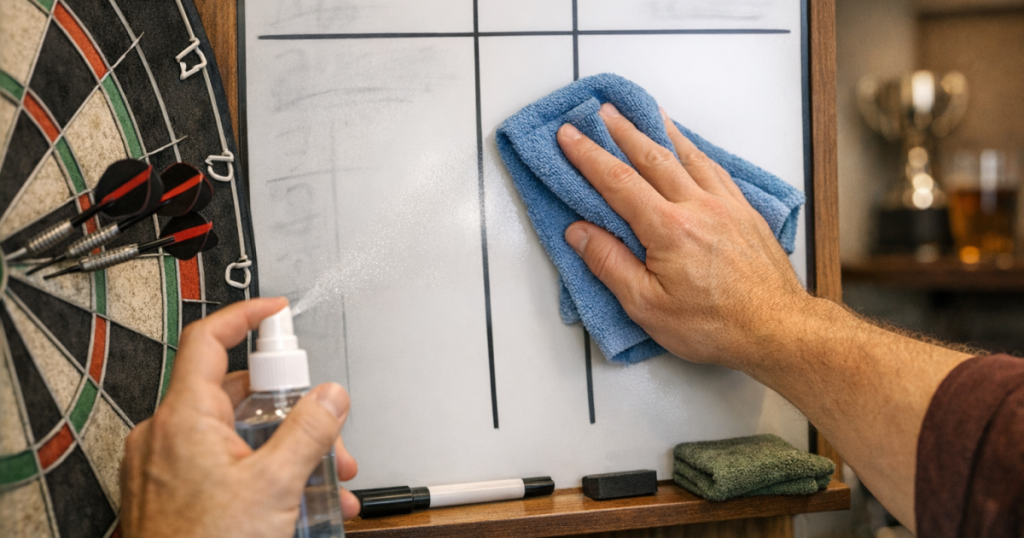
- Wipe with a clean, dry microfibre cloth first; dirty cloths often spread old ink rather than removing it.
- For stubborn shadowing, use a suitable whiteboard cleaner sparingly and test a corner before treating the whole surface.
- Avoid scouring pads, rough paper towels, bleach, acetone and heavy household degreasers, as they can dull or damage the writing layer.
- Let the surface dry fully before writing again, especially in a garage, shed or colder spare room.
Why ghosting happens on darts scoreboards
Ghosting is the faint shadow left behind after you wipe away a score. It is more common on boards that see repeated scoring in the same areas: treble counts, legs won, player names and checkout notes tend to be written in almost identical positions every time.
The main culprit is usually a build-up of dry-wipe ink binder. When the liquid part of the marker evaporates, a coloured residue remains on the surface. A clean board lets that residue lift easily, but grease from hands, dust, damp air and old cloth fibres can create a thin film. Instead of lifting the ink, the cloth smears it into the surface texture.
Material matters too. A glossy glass or high-quality enamel-style board usually resists staining better than cheaper laminated or melamine-style panels. Printed darts scoreboards, including those with permanent grids or outshot sections, can be more sensitive because strong cleaners may attack the printed layer. That is why a careful test patch is worth the extra minute.
Step 1: Check what type of surface you are cleaning
Before reaching for cleaner, look at the board from an angle under decent light. You are checking whether the writing surface is a separate glossy layer, a printed laminate, a magnetic dry-wipe face, or a budget board with a thinner coating.
- Glossy whiteboard-style surfaces: usually tolerate normal dry-wipe cleaning fluid, used lightly.
- Printed checkout or scoring grids: need more care because harsh solvents can fade lines or lift print.
- Magnetic boards: clean much like standard whiteboards, but trapped dust around magnets or rails can drag across the face.
- Cabinet-mounted score panels: may have timber edges, hinges or trim nearby, so avoid flooding the surface.
If the board lives close to the throw area, also check whether stray dart marks, wall dust or chalk from nearby accessories are contaminating the surface. A tidy setup helps: if the scoring area is awkwardly placed, near a walkway or pressed too close to furniture, it tends to get touched and smudged more. For room layout, it is worth reading our guide to choosing the right wall for your dartboard so the board, scoreboard and throw line all work together.
Step 2: Remove loose dust before using any liquid
Dry cleaning should come first. Use a clean microfibre cloth and wipe in straight, overlapping passes rather than frantic circles. Circles can keep moving residue around the same patch, which is exactly how a grey haze forms.
If you have been using an old eraser, give it a shake outside or replace it if the pad is packed with ink. A tired eraser is one of the easiest ways to make ghosting worse. It can look as though the board is stained when the real problem is that the eraser is full of old marker dust.
For corners, score boxes and printed checkout areas, fold the cloth over a fingertip and wipe gently along the printed lines. Do not scrape at the edges of printed sections. If ink has collected in a small surface scratch, you may not remove every mark, but you can often reduce the contrast enough that it no longer affects scoring.
Step 3: Use the right cleaner in the right amount
Once loose ink is gone, move to a damp clean. Spray a purpose-made whiteboard cleaner onto the cloth, not directly onto the board, then wipe a small area. This gives you better control and stops liquid running into frame edges, cabinet seams or wall fixings.
If you do not have whiteboard cleaner, a cloth lightly dampened with clean water may remove fresh residue. For more stubborn staining, some boards can be cleaned with a small amount of isopropyl alcohol on a cloth, but only after checking the board’s care guidance and testing a hidden corner. If the cloth picks up the printed grid colour or the surface becomes dull, stop immediately.
After using any liquid, follow with a second dry microfibre cloth. This final dry pass matters. Leaving cleaner to air-dry can leave its own film, which then grabs marker ink the next time you write.
Step 4: Try the marker-over-marker method for stubborn shadows
For a stubborn number, name or checkout note that will not shift, use a fresh dry-wipe marker to write over the ghosted mark. While the new ink is still wet, wipe it away with a clean cloth. The fresh marker can re-wet the old residue and help it lift.
Use this method only with a genuine dry-wipe marker. Do not try it with permanent marker, paint marker or chalk pen. Work on one small patch at a time and avoid pressing hard, as pressure can leave dents or polish marks on softer surfaces.
If a permanent marker has accidentally been used, the same method sometimes reduces the mark, but it is not guaranteed. A stronger solvent may damage the surface or the printed scoring grid, so it is better to accept a faint mark than ruin the whole board face.
Step 5: Stop ghosting coming back during normal play
The best anti-ghosting routine is simple: wipe scores fully at the end of play, keep one cloth for dry wiping, and do a deeper clean when the surface starts to feel grabby. If the marker squeaks, skips or leaves dusty edges, it may be drying out or the board may have a residue film.
- Use low-odour dry-wipe markers designed for whiteboards. Keep permanent markers away from the scoring area so nobody grabs the wrong pen mid-game.
- Cap markers properly. Dry tips can leave uneven, stubborn lines that are harder to wipe.
- Rotate where you write names and notes. Repeated pressure in the same box can make wear more visible.
- Clean the cloth regularly. Wash microfibre cloths without fabric conditioner, as conditioner can leave a smear-prone coating.
- Do not store the board face-down on dusty surfaces. Fine grit can scratch the coating when you next wipe it.
In a garage setup, damp air can make the problem worse because moisture, dust and temperature changes encourage smearing. If your scoring panel sits near a cold external wall, check our tips on how to keep darts gear dry in a garage setup. The same habits that protect darts and boards also help dry-wipe surfaces stay clean.
Common cleaning mistakes that make ghosting worse
Most damaged scoreboards have been over-cleaned rather than under-cleaned. Dry-wipe surfaces are designed to release marker ink, but they are not designed to be scrubbed like a kitchen worktop.
- Using kitchen roll as the main cloth: some paper towels are rough enough to create fine scratches, and those scratches hold ink.
- Spraying cleaner straight onto the board: liquid can run behind trims, into cabinet joints or under printed layers.
- Using abrasive pads: they may remove a mark once, but they can permanently dull the finish.
- Leaving scores up for weeks: the longer ink sits, the more likely it is to leave a shadow.
- Mixing marker types: dry-wipe, wet-erase, chalk and permanent markers behave differently, even when the colours look similar.
Also think about where the scoreboard sits in relation to the oche. If players brush past it when stepping away from the throw line, finger marks and sleeve contact will keep adding grease to the surface. For a cleaner playing area, our advice on how to mark a throw line without damaging flooring can help keep the scoring zone and player movement better organised.
A simple after-game routine
Once the match is finished, remove all scores rather than leaving the last leg on display. Wipe dry first, then use cleaner only if the board still looks hazy. Dry it again before closing a cabinet door or putting the scoreboard away.
If you host regular darts nights, keep a small cleaning kit near the setup: two microfibre cloths, a suitable dry-wipe cleaner, and a set of known-good markers. Label the cloths if needed: one for dry wiping during games, one for cleaner. It sounds fussy, but it stops wet cleaner residue being dragged through fresh ink during the next leg.
For boards with printed checkout guides, inspect the busiest areas every few weeks. If you spot early hazing, deal with it gently before it becomes a permanent-looking patch. Regular light cleaning is much safer than one aggressive rescue job.
When the board may be beyond saving
A dry-wipe darts scoreboard that has lost its glossy feel, shows a dull patch under light, or stains immediately after fresh writing may have worn through its surface layer. At that point, cleaning can improve appearance but may not restore easy wiping.
Deep scratches are another limit. Ink settles into the grooves, and each clean only reaches the top surface. If the scoring grid is still readable, you can keep using the board, but expect to clean it more often. If old scores are confusing players or affecting match flow, replacing the panel may be the more sensible fix.
For occasional home play, a faint shadow is not a disaster. For league-style nights, family tournaments or any setup where several players need to read the score quickly, a clear surface matters more. Good scorekeeping keeps the game moving and prevents arguments over what was actually written down.
Things readers ask
Can I use baby wipes on a darts scoreboard?
It is better not to rely on them. Some wipes leave moisturising or cleaning residue that makes future marker ink smear. A clean microfibre cloth and proper whiteboard cleaner is safer.
Why does my board look clean, then ghost again when I write?
There is probably a thin film left on the surface. Do a dry wipe, clean lightly, then buff fully dry with a second cloth before writing again.
Will vinegar remove dry-wipe ghosting?
It can sometimes cut through light residue, but it is not ideal for every printed or coated surface. Test a small corner first and avoid soaking the board.
How often should I deep-clean the scoreboard?
For regular home play, a light clean after sessions and a deeper clean when haze appears is enough. Heavy weekly use may need a more thorough wipe every few playing nights.
Can I use the same cloth for the dartboard surround and scoreboard?
Not ideally. Surrounds and walls collect dust and rubbery residue that can scratch or smear a dry-wipe surface. Keep a separate cloth for scoring only.
What to remember
Ghosting is usually a cleaning and residue problem, not a sign that the board is ruined. Start with a clean dry cloth, use the mildest suitable cleaner, avoid abrasives, and always finish by buffing the surface dry.
The habit that makes the biggest difference is wiping the board properly at the end of play. Do that consistently, store markers correctly, and keep damp or dusty conditions under control, and your scoring surface should stay clear enough for every leg, set and late-night rematch.