A dart scoring app can make home matches feel tidier, quicker and less argumentative, provided it is set up properly before the first throw. The aim is not to turn a relaxed night of darts into a tournament desk; it is to make scoring clear enough that everyone can focus on throwing, checking out and enjoying the game.
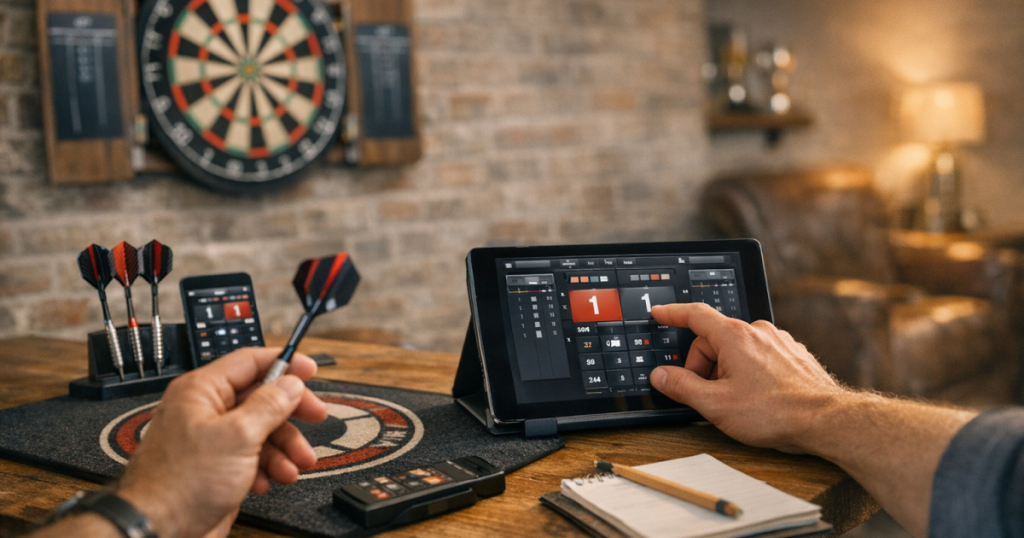
The best setup depends on your room, your players and how formal your matches are. A phone on a side table may be enough for casual legs, while a tablet near the board can work better for regular 501 sessions with guests.
The short version
- Choose an app that supports the game formats you actually play, such as 501, 301, cricket or around the clock.
- Create player names before the match starts so the throwing order is obvious.
- Set the correct starting score, finish rule and number of legs or sets.
- Place the device where the scorer can reach it without standing in the thrower’s eyeline.
- Do one test leg before a proper match to catch display, sound or input issues.
Step 1: Choose the right match format first
Start with the match you want to play, not with the app’s longest feature list. For most home darts nights, 501 is the default because it is familiar, easy to follow and works for two players or pairs. If you are playing with beginners, 301 can keep legs shorter and less punishing.
Check the following before you settle on an app for the evening:
- Game type: make sure it supports your preferred format, rather than assuming every scoring screen works the same way.
- Player count: confirm it can handle singles, pairs or a small group if you rotate players.
- Finish rules: decide whether you want double-out, single-out or a more relaxed house rule.
- Checkout help: some players like suggested finishes; others prefer to work them out themselves.
- Input style: choose between entering three-dart scores, individual dart scores or tapping board segments, depending on who is scoring.
If you are still getting used to 501, it helps to understand the scoring logic before relying on a screen. The basics are covered clearly in how to score 501 on a darts scoreboard, and the same principles apply whether you use chalk, a dry-wipe board or a phone.
Step 2: Set up players and throwing order
Enter names clearly before the first visit. It sounds obvious, but unclear player labels are one of the easiest ways to create confusion, especially when guests are playing pairs or when several people have similar names.
For casual home games, short names are usually best. Use “Dad”, “Sam”, “Ali” or “Team Left” rather than long labels that shrink on the screen. If the app allows player profiles, only use them when they genuinely help; for a quick night of darts, simple names keep the pace better.
Decide the throwing order before entering the first score. You can bull up, toss a coin, rotate from the previous leg or agree a house rule. What matters is that the order in the app matches the order at the oche. If two players throw in the wrong sequence, it is easier to restart a test leg than to untangle the scoring halfway through.
Step 3: Match the app settings to your house rules
Most scoring mistakes happen because the app and players are using different assumptions. Before starting, agree the setup out loud:
- Starting score: 501 for a standard leg, or 301 for shorter games.
- Finish rule: double-out for traditional 501, or a relaxed finish for mixed-ability groups.
- Number of legs: decide whether you are playing first to 3, best of 5, or just single legs.
- Bust handling: make sure everyone understands that bust scores return the player to their previous total in standard 501.
- Checkout prompts: agree whether suggested finishes are allowed during the match.
For beginners, checkout prompts can be useful because they reduce long pauses and mental arithmetic pressure. For more serious practice, turning them off can help players learn combinations and think more like they would in a league or pub match.
Step 4: Put the device in the right place
The device should be easy for the scorer to reach but not so prominent that it distracts the thrower. In a small UK spare room, garage or shared lounge, that usually means avoiding the direct sightline between the oche and the board.
A side table near the throw line often works well for phones. A tablet can sit on a stand, shelf or cabinet edge, provided it is stable and not close enough to the board to be struck by a dart. If you are using a wall-mounted screen or a cable-fed display, keep trailing leads out of the walking route and away from the throwing area. For neater home setups, tidying scorer cables around a dartboard is worth sorting before match night rather than during it.
Also think about viewing angle. The thrower does not need to read every detail while at the oche, but they should be able to see their remaining score without leaning into the lane or stepping forward after each visit.
Step 5: Make scoring quick and consistent
For home matches, the simplest workflow is usually one scorer entering each three-dart total. The thrower calls the score, the scorer repeats it back, then enters it. That quick repeat catches many mistakes before they become awkward.
Use this rhythm:
- The player throws three darts.
- The player or marker calls the total clearly.
- The scorer repeats the number before tapping it in.
- The next player waits until the score has updated.
- If a mistake is spotted, correct it before the next visit starts.
Avoid letting everyone tap the screen whenever they walk past. Shared input sounds casual, but it often leads to double entries, wrong player turns and arguments over whether a correction happened before or after the next throw.
Step 6: Do a one-leg test before the proper match
Run one short practice leg with the actual players, device position and match settings. This takes a few minutes and can prevent a messy restart later.
During the test, check:
- whether the screen stays readable from the scoring position;
- whether the device goes to sleep too quickly;
- whether adverts, pop-ups or account prompts interrupt the flow;
- whether sound effects are helpful or irritating in the room;
- whether corrections are easy enough to make when someone miscalls a score.
If the test feels fiddly, simplify the setup. Turn off anything you do not need, reduce the number of players if people are rotating informally, or use a basic score-entry mode rather than a detailed dart-by-dart mode.
Step 7: Keep the room setup working with the scoring setup
A scoring app is only one part of a comfortable home darts area. Poor lighting, tight floor space and awkward walking routes can make the whole match feel clumsy even when the scoring is accurate.
Check that players have a clear oche, a safe retrieval path and enough light on the board. If the board face is unevenly lit, players may hesitate over trebles, miss segment calls or argue over close darts. For a more consistent setup, see how to light a dartboard without shadows or glare.
In shared rooms, the device also needs a home between games. A small stand, drawer or shelf keeps the scoring area tidy and reduces the chance of a phone being knocked, stepped on or buried under coats and drinks.
Useful app choices to know about
There are plenty of scoring apps available, and the right choice may depend on your phone, tablet and preferred match style. Well-known options include DartCounter, Russ Bray Darts Scorer and My Dart Training. Before relying on any of them for a proper match, check the current app store listing for device compatibility, included game modes, account requirements, adverts and any paid features.
For relaxed home use, the most important test is not how many features the app lists. It is whether the scorer can enter totals quickly, correct mistakes easily and keep everyone clear on whose turn it is.
Common questions
Should the scorer enter each dart or the three-dart total?
For most home matches, entering the three-dart total is quicker and less distracting. Dart-by-dart entry can be useful for practice stats, but it slows down casual games.
Can beginners use checkout suggestions?
Yes, if everyone agrees before the match. Checkout suggestions can help newer players learn finishes, but turning them off is better when players want more realistic match practice.
What is the best device for scoring at home?
A tablet is easier to read, but a phone is often enough for two-player games. Choose the device that can sit safely, stay visible and be reached by the scorer without disrupting the thrower.
What should I do if the wrong score is entered?
Correct it before the next player throws. If another visit has already started, pause the game and agree the last confirmed score before continuing.
Do I still need to understand manual scoring?
Yes. Apps are helpful, but knowing how 501 totals, busts and finishes work makes it much easier to spot errors and keep the match fair.
The big picture
A good scoring setup should feel almost invisible. The app records the match, the players know the order, the totals are easy to follow, and nobody has to stop for long discussions after every visit.
Set the format first, agree the finish rule, place the device sensibly and test one leg before it counts. Once those basics are right, home matches become smoother whether you are playing a quick best of 3 in the lounge or a more serious evening of 501 in a dedicated darts space.